


INCORTA BUILDER
From insight to action,
all in one place
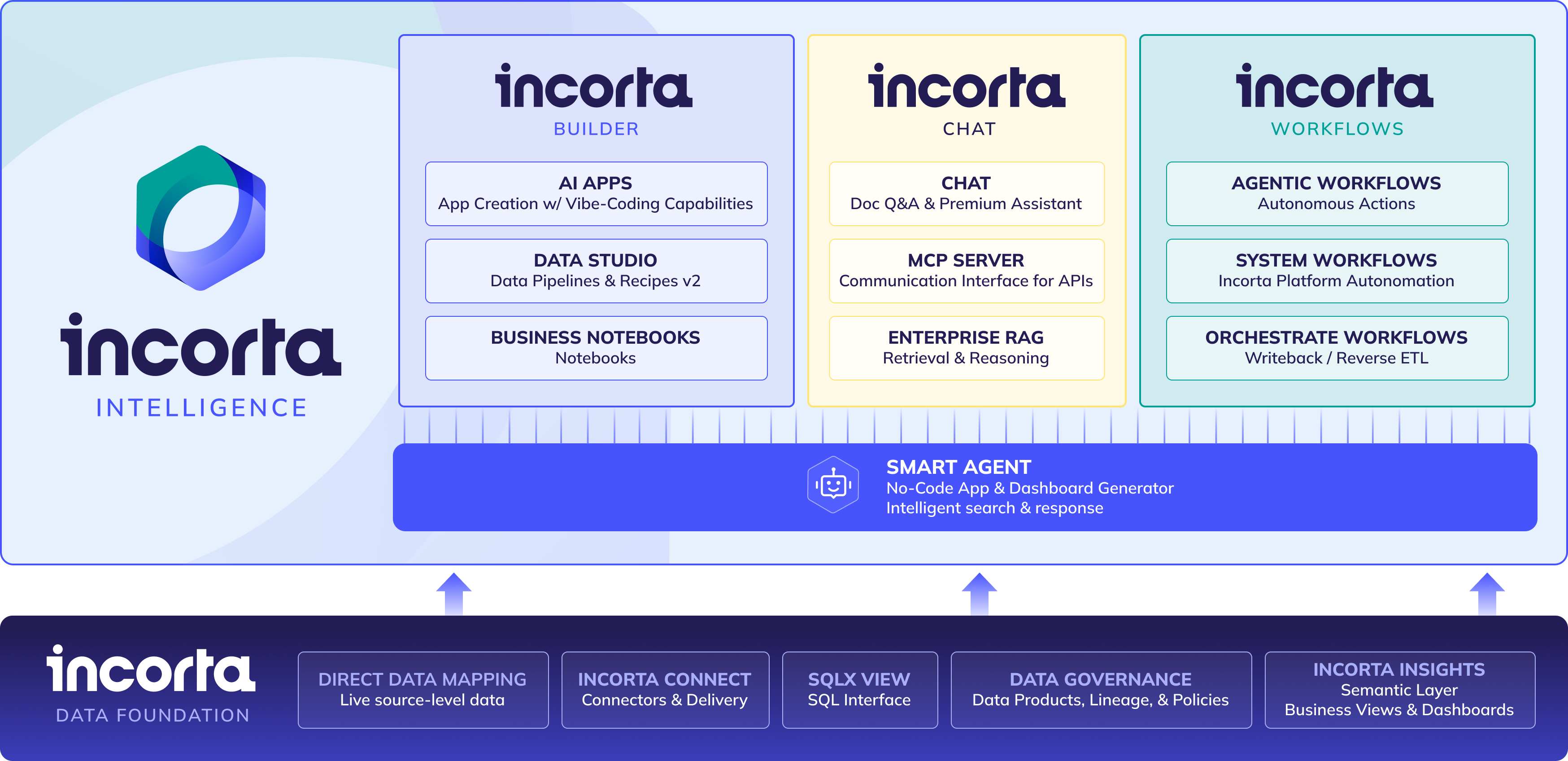
Incorta Builder lets every team build AI-powered apps on live, trusted enterprise data.
What will you build first?
Incorta Builder gives users the power to build apps on live enterprise data and act immediately, without expensive new tools, new pipelines to babysit, or another IT bottleneck.
Stop analyzing, start doing

Turn every insight into
a next step
Most analytics tools surface the answer and stop there - Incorta Builder picks up where they leave off. Teams can submit approvals, trigger workflows, and update records without switching platforms or waiting on IT.

Build apps your business can trust on data you already govern
Every app you build runs on your live enterprise data - your security controls, permissions, and data context carry over automatically, so every user and agent is working from the same trusted source.

Build more, buy less - without the IT bottleneck
Incorta Builder lets analysts and business users create production-ready apps alongside engineering - without adding new SaaS tools, onboarding overhead, or procurement cycles.

End-to-End App Deployment
Take an app from idea to production entirely within Incorta without separate hosting or handoffs to other teams. Your app is live, governed, and ready to go.

Dashboard Integration
Embed interactive Incorta apps directly inside your existing dashboards, so users can take action without ever leaving the analytics environment they already work in.

Row-Level Security
Every app automatically enforces the data access rules your organization already has in place -so each user only sees and acts on the data they're authorized for, with no extra configuration required.

User Authentication
Incorta Builder connects to your existing identity and access management systems, giving users a seamless, secure login experience and keeping IT in control of who can access what.

Live Data Consumption
Apps pull directly from Incorta's real-time data layer. Every decision your team makes is backed by the most current information available.

Credentials Management
API keys and database connection strings are stored and managed securely through Incorta's native secrets management, so sensitive credentials are never hardcoded or exposed in app logic.

Application Validation
Built-in quality checks catch issues before an app goes live, helping teams maintain reliable, consistent output across the apps they build and share across the organization.

AI-Ready Governance
AI agents and automations built inside Incorta Builder inherit the same governance standards as any human user -role-based access, audit trails, and organizational context - making enterprise AI adoption safer and more predictable.
INCORTA WORKFLOWS
Builder helps you act. Workflows helps you scale.
Incorta Workflows takes action one step further - letting your apps trigger intelligent automations, push decisions back
into your source systems, and keep every stakeholder aligned without manual follow-up.
Agentic Workflows
Most "agentic" tools find answers. Incorta's act on them - triggering actions, routing approvals, escalating issues, all under full governance.
Orchestrate Workflows
Insights mean nothing locked inside your analytics tool. Orchestrate writes decisions back to source systems, routes reports automatically, and connects Incorta to the rest of your stack - all from one place.
Related Content
.png)
Incorta Intelligence: Moving Analytics From Dashboards to Decisions
.png)
Explore what's possible with Incorta Builder
